Welcome to
CPM Datathon 2026
From Wildfire Data to First Submission Guide
09 May 2026

Welcome to
09 May 2026Step 1 — Join the Competition
Log in to Kaggle
Go to: 👉 https://www.kaggle.com/competitions/WiDSWorldWide_GlobalDathon26
Click Late Submission
Accept the rules
Step 2 — Create Your First Notebook
Click the Code tab
Click New Notebook
In Session Options, make sure:
Notebook language: Python
Internet: OFF (default) - Keep it OFF!
Click Create
You now have a Jupyter-style notebook!
You can find your notebook under the “Your Work” tab.
Rename your notebook
Name your notebook as cpm20260509-groupX (replace the ‘X’ to your group number). Failure to rename the notebook will disqualifyyour datathon submissions.
Step 3 — Add Competition Data
On the right side panel:
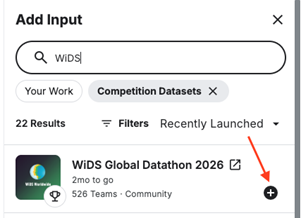
Click Add Input
Filter with “competition datasets”, type “WiDS” and find the correct dataset
Click Add (the “+” circle)
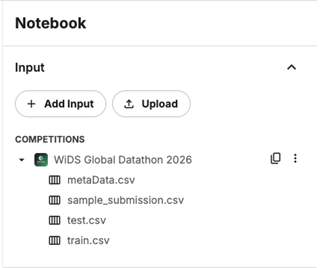
You should now see the dataset in the Input of your Notebook:
Step 4 — Import the Starter Code
Go to the menu bar, click File → Import Notebook → Link
In the URL field, add the link below:
https://github.com/sxz2012/Datathon-Code/blob/main/Datathonnotebook.ipynb
Now you have a working notework!
To run the code, click the Run button (the triangle icon located just to the top-left of the code cell).
Mentors and student leaders are here to help you. Raise your hand when you need help.